
Browse, query, and edit your databases in one app. Written in Rust and drawn on the GPU. Free and open source.
Apple Silicon · Notarized by Apple · MIT licensed
DBXisbuiltwithGPUI,theRustUIframeworkbehindtheZededitor.There'snoElectron,webview,orbrowserruntimeunderneath,andeveryframeisdrawnonyourGPU.
Built for everyday database work
Reach it however you can
Paste a connection URL or fill in the details. Tunnel through a bastion, use a local socket, or fetch a short-lived token from your cloud CLI.
- SSH tunnelJump hosts, agent or key, checked host keys
- Unix socketLocal or through the tunnel
- TLSCertificates verified by default
- Cloud tokensAWS RDS IAM and Azure Entra
Keep everything open
Connect to several databases at once. Jump between tables with quick open, keep named queries, and recover encrypted query drafts.
Filters, not WHERE clauses
Save structured filters on relational tables. They run as bound parameters, so your values stay separate from SQL.
WHERE status = $1 AND budget > $2
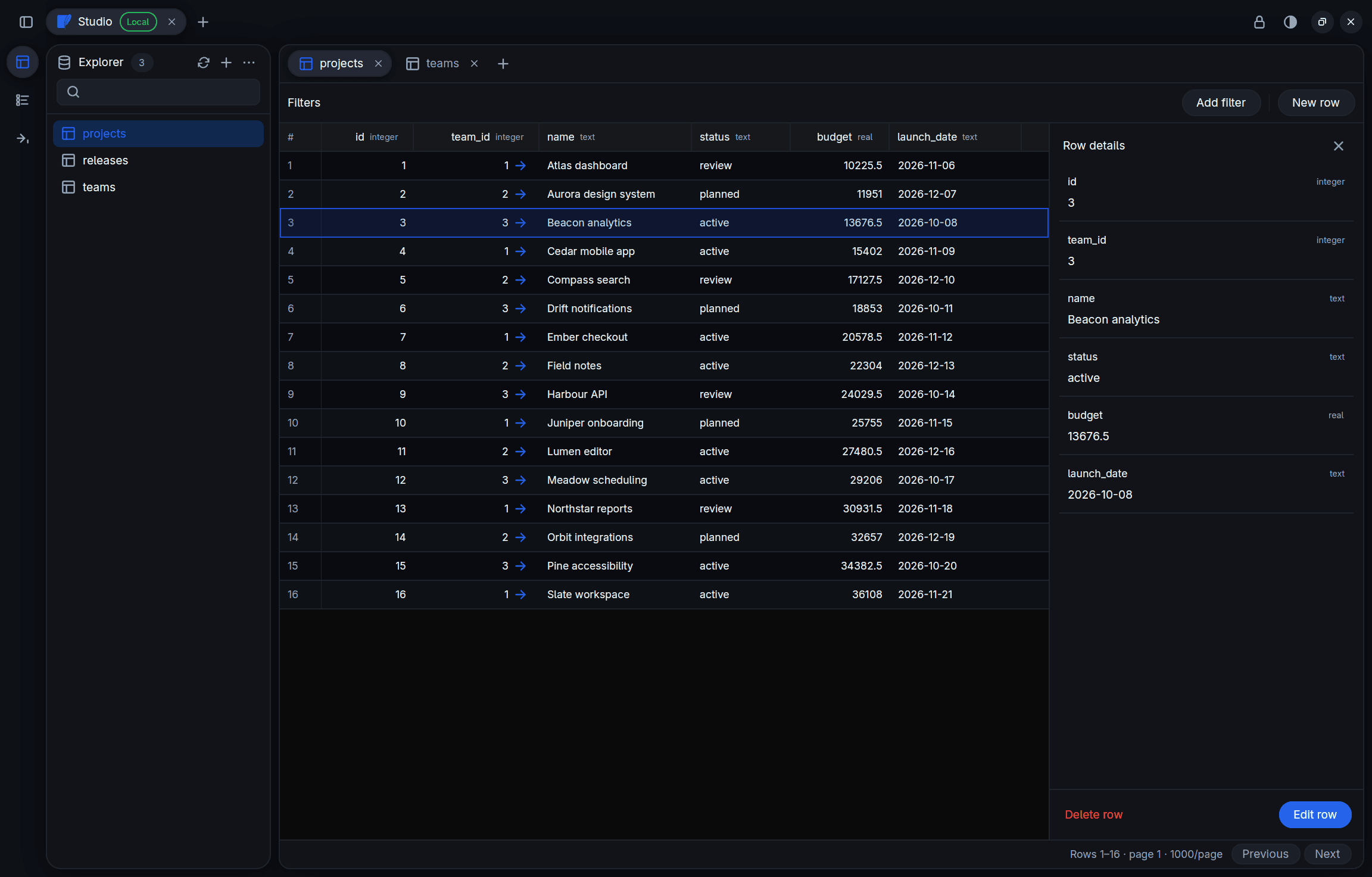
Every field at a glance
Select a row to see all of it. Follow a foreign key straight to the row it points at.
Redis, properly
Browse keys with incremental SCAN, then drop into a command console.
› HGETALL session:4f2a
1) "user_id"
2) "1042"
› TTL session:4f2a
(integer) 3600
Data in, data out
Export a table or a whole database with gzip and schema-only options. Import SQL dumps, CSV, and TSV.
Review changes before saving
Stage inserts, edits and deletes together. Review the SQL, check for conflicting changes, and protect connections you only need to read.
Looks like it belongs
Light, dark, or follow the system. Glass chrome over your desktop, with reduce transparency when you want it.
Works with what you run
Native connectors, each with its own query language and explorer. Same keyboard, same grid, same muscle memory.
Relational
- PostgreSQLSchemas, sessions, locks, foreign keys
- MySQLDatabases, structure, sessions, locks
- SQLiteOpen any file on disk
- SQL ServerIndexes, checks, row edits
- CockroachDBPostgreSQL wire, TLS options
- SupabaseThrough the PostgreSQL connector
Embedded and edge
- DuckDBLocal files or in memory
- TursolibSQL over HTTP
- Cloudflare D1SQL through the REST API
Analytics
- ClickHouseHTTP or TLS, ClickHouse Cloud
- BigQueryGoogleSQL, datasets, paged jobs
- SnowflakeSQL API, warehouses, partitions
Documents, keys, and streams
- MongoDBJSON commands, collections
- RedisSCAN browsing and a console
- ElasticsearchIndices and search requests
- KafkaConsume and produce on topics
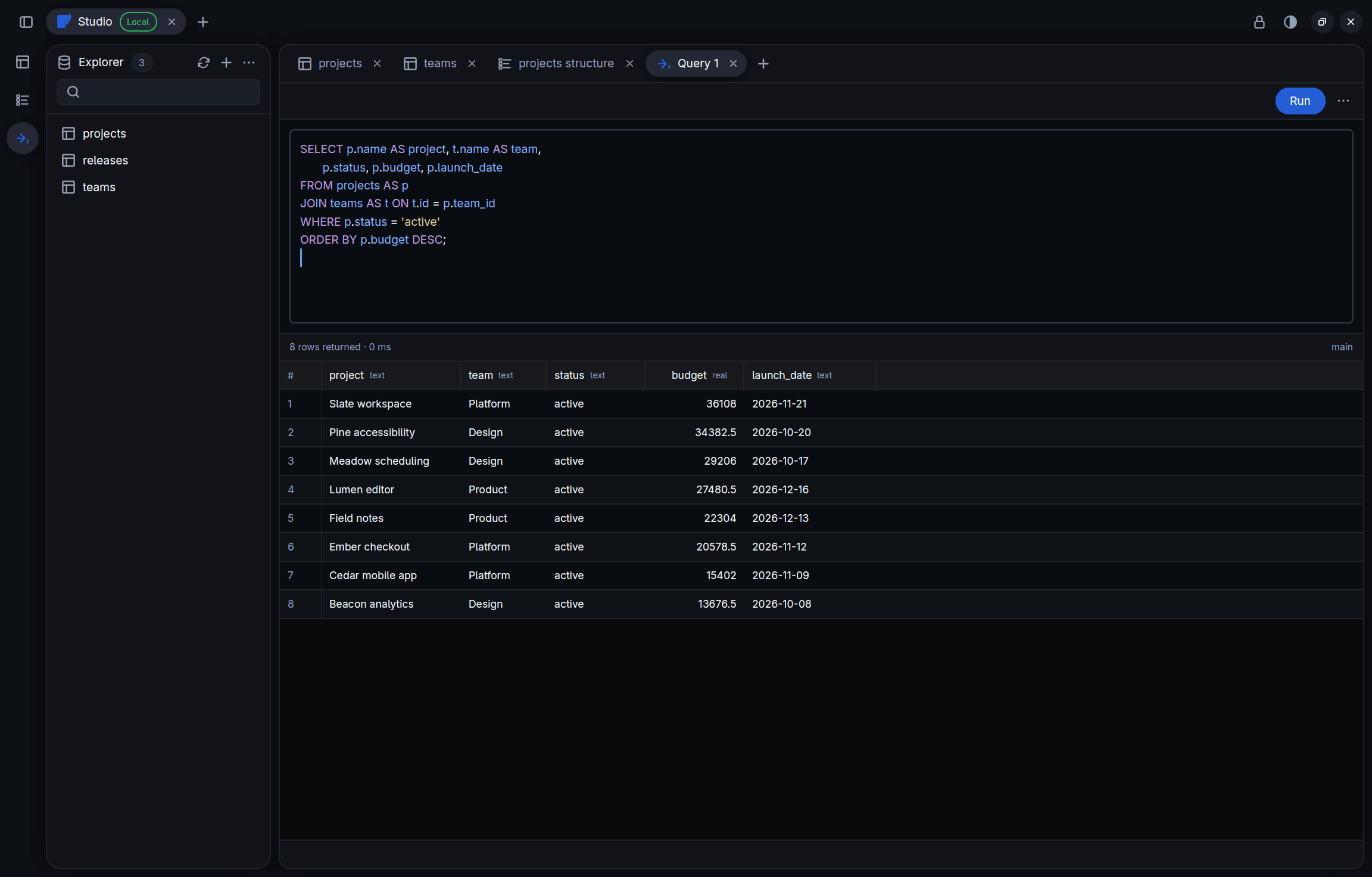
A proper SQL editor
Syntax highlighting, schema-aware completion, and a result grid that stays put while the next query runs. History is kept per connection, and loading it never runs anything.
- ⌘↵Run the statement under the caret
- ⌘⇧↵Run the whole document
- EscCancel a running query
Destructive changes ask first
Organise connections with colour-coded tags. Start with Prod, Staging, Dev, and Local, then add your own tags and pick their colours.
Updates find rows by primary key
Edits and deletes target exactly one row. No key, no guesswork.
Value, NULL, or Default
Every field says what you mean. An empty string is never quietly a NULL.
Destructive means confirmed
Truncate, drop, and destructive SQL stop and ask before they run.
Your draft survives errors
When the database rejects a change, you see why, and your edits stay put.
Passwords stay encrypted
Saved credentials live in an encrypted vault that DBX owns. Your connection list stays password-free, and the vault never leaves your machine.
Prefer not to type the passphrase every launch? Device unlock keeps the derived key in macOS Keychain or Secret Service. The passphrase itself is never stored.
- 01Your passphraseNever written to disk
- 02Argon2idMemory-hard key derivation
- 03XChaCha20-Poly1305Authenticated encryption
- 04DBX VaultSealed credentials, on your machine
Download DBX
MIT licensed. No account and no telemetry. Download a build or compile it yourself.
macOS
Apple Silicon. Signed with Developer ID and notarized by Apple.
Unzip and move DBX.app into Applications.
Linux
Wayland or X11 with a Vulkan driver. Build it with Rust 1.97 or newer.
Build instructions and dependencies$ git clone https://github.com/jrmd/dbx.git && cd dbx$ make linux-run
DBX is a preview and in active development. Point it at a disposable database and a least-privilege account while you try it out.